Security and identity management are critical components of modern applications. Whether you are building a SaaS platform, mobile app, or customer portal, protecting user accounts is essential.
By integrating Auth0 with DataFlows SMS, developers can send secure SMS verification codes, authentication alerts, and multi-factor authentication messages to users during the login process.
This integration helps applications add an extra layer of security while maintaining a smooth user experience.
What is Auth0?
Auth0 is a popular identity platform that allows developers to easily implement secure login systems, authentication, and user identity management in applications. It supports features such as single sign-on (SSO), social logins, multi-factor authentication, and passwordless login methods.
Instead of building authentication infrastructure from scratch, developers can use Auth0 to quickly add secure login flows to web apps, mobile apps, and APIs.
Why Use SMS Authentication?
Many modern applications use SMS verification to confirm a user’s identity.
SMS authentication can be used for:
• One-time password (OTP) verification • Multi-factor authentication (MFA) • Passwordless login • Account recovery • Security alerts
Auth0 supports passwordless authentication using SMS, where users receive a one-time code on their phone and enter it to verify their identity.
By connecting DataFlows as the SMS provider, your application can deliver these verification messages instantly.
How DataFlows Works with Auth0
When integrated with Auth0, DataFlows can deliver SMS messages as part of your authentication flow.
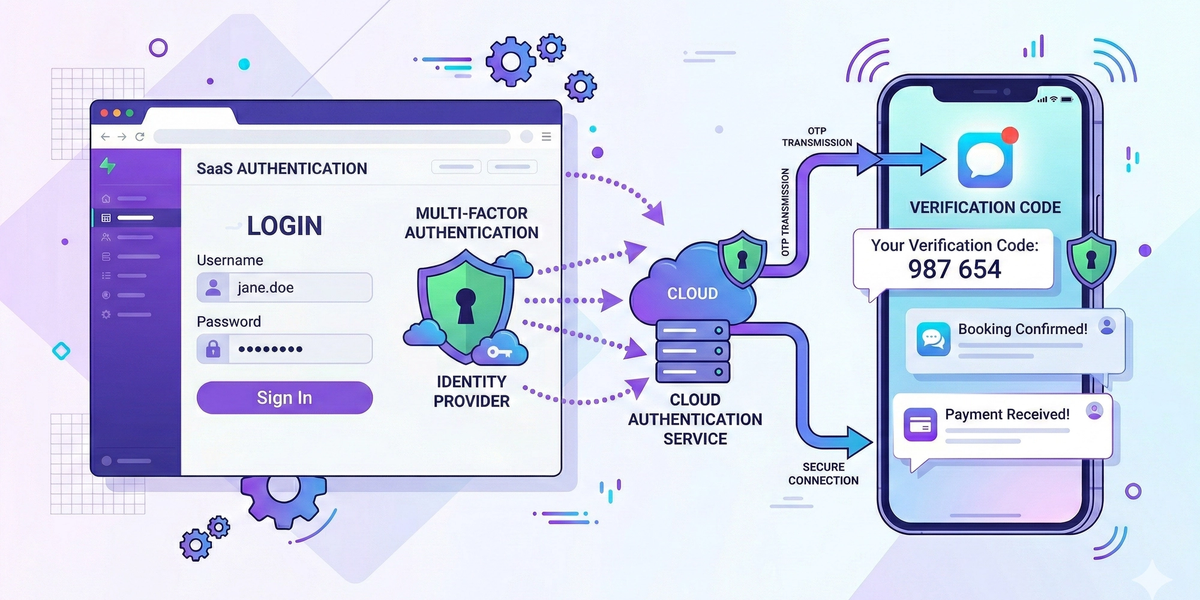
Typical authentication workflow:
1️⃣ A user attempts to log in to your application 2️⃣ Auth0 generates a one-time verification code 3️⃣ The system sends the code via DataFlows SMS 4️⃣ The user enters the code to verify their identity
This process ensures that only users with access to the registered phone number can complete the login.
Common Use Cases
SMS One-Time Password (OTP)
OTP messages are commonly used during login or registration.
Example message:
Your verification code is 483921. Enter this code to continue logging in.
Multi-Factor Authentication (MFA)
SMS can act as a second authentication factor, making it much harder for attackers to access accounts.
Example:
Security code: 762198. Enter this code to confirm your login.
Passwordless Login
Some modern apps eliminate passwords entirely. Users simply enter their phone number and receive a one-time code to sign in.
This simplifies the login experience while maintaining security.
Account Security Alerts
SMS can also notify users when suspicious activity occurs.
Example message:
A login attempt was detected from a new device. If this wasn't you, please reset your password immediately.
Connecting DataFlows to Auth0
To start sending authentication SMS messages:
1️⃣ Create a DataFlows account
2️⃣ Go to the Developer section in your dashboard
3️⃣ Generate your API Token
4️⃣ Use this API token to connect your DataFlows account to your authentication workflow
Once connected, Auth0 can use DataFlows to deliver verification messages to users during login or registration.
Example Authentication Workflow
A common authentication workflow using Auth0 and DataFlows might look like this:
• User enters phone number during login • Auth0 generates a one-time verification code • DataFlows sends the code via SMS • User enters the code to verify identity • Access to the application is granted
This approach is widely used in SaaS applications, fintech platforms, and secure customer portals.
Benefits of Using DataFlows SMS with Auth0
• Secure SMS verification delivery • Reliable authentication messaging • Easy integration with APIs • Ideal for MFA and passwordless login • Scalable for applications with thousands of users
Combining Auth0’s identity management with DataFlows messaging infrastructure creates a powerful authentication solution for modern applications.
Conclusion
Authentication security is essential for protecting users and applications.
By integrating Auth0 with DataFlows SMS, developers can deliver secure verification codes, authentication alerts, and multi-factor authentication messages with minimal development effort.
If your application uses Auth0 for identity management, adding SMS messaging through DataFlows is a simple way to improve both security and user experience.