Introduction
Microsoft Teams has become the go-to platform for collaboration in modern workplaces. But while Teams excels at chat, video, and file sharing, many businesses still rely on SMS messaging for customer communication, reminders, alerts, and service updates.
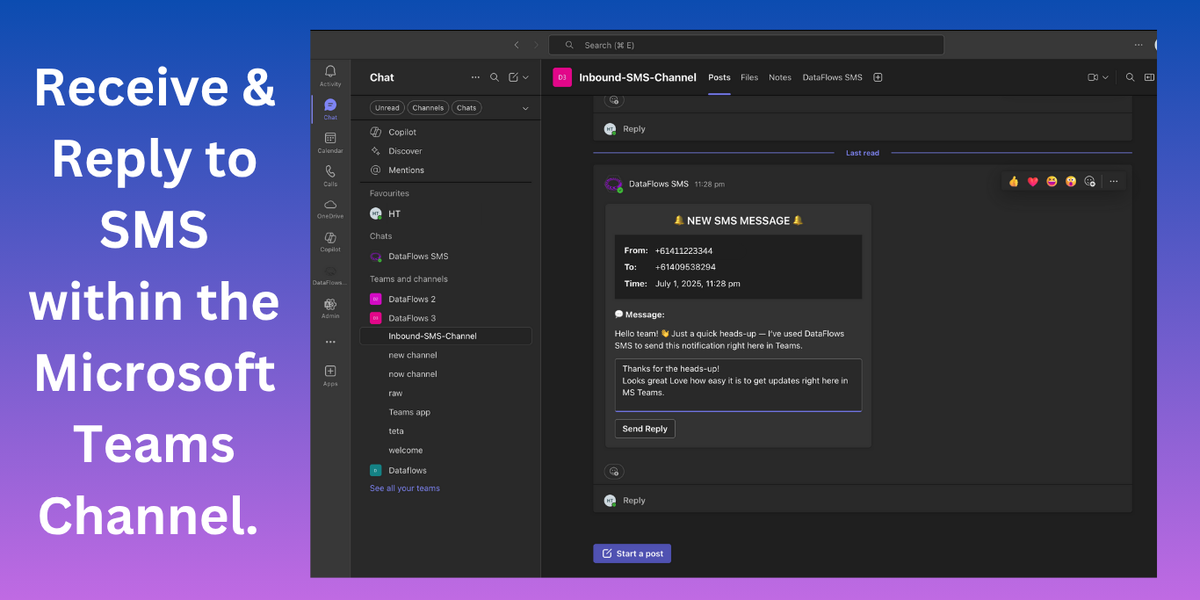
That’s where DataFlows’ Microsoft Teams SMS Integration comes in. Our solution brings SMS directly into Teams, giving your staff the ability to send and receive text messages without switching platforms.
Why Integrate SMS with Microsoft Teams?
SMS remains one of the most effective communication channels:
98% open rate compared to 20–30% for email.
Fast delivery and instant engagement.
Preferred for appointment reminders, service updates, and customer support.
But managing SMS separately from your internal communication tools can be inefficient. By integrating SMS with Teams, you can:
Centralise communication – no more juggling between Teams and an external SMS tool.
Improve response times – reply to customers directly in Teams channels or chats.
Boost collaboration – teammates can see SMS conversations and coordinate responses.
Key Features of DataFlows’ Teams SMS Integration
Our integration is designed to be simple, powerful, and scalable:
✅ Two-way SMS inside Teams – send and receive text messages without leaving Teams.
✅ Shared inbox – manage all SMS conversations in one place.
✅ Real-time notifications – get alerts in Teams whenever a new SMS arrives.
✅ Customer history tracking – keep records of past conversations for better service.
✅ Scalable for teams – assign messages to different team members or departments.
Use Cases
Here are some practical ways businesses use our Microsoft Teams SMS integration:
Customer Support: Respond to client inquiries via SMS directly in Teams.
Service Updates: Notify customers of order status, outages, or changes.
Appointment Reminders: Reduce no-shows by sending automated SMS reminders.
Internal Alerts: Send critical updates (e.g., IT system downtime, security alerts) to staff mobile numbers.
How It Works
Connect Microsoft Teams to DataFlows.
Assign a phone number for sending and receiving SMS.
Start messaging – new SMS conversations appear in Teams channels or chats.
Collaborate – your team can reply, assign, and track messages together.
No complicated setup. Just plug it in and start messaging.
Benefits for Your Business
Happier Customers: Faster, more reliable communication.
Better Teamwork: Everyone stays in the loop.
Reduced Costs: No need for separate SMS platforms.
Future-Proof: Scales with your business as Teams grows.
Get Started Today
If your business relies on SMS, integrating it with Microsoft Teams is a game-changer. With DataFlows’ Microsoft Teams SMS integration, you’ll save time, improve customer satisfaction, and keep all your communications in one place.
👉 Explore the integration here