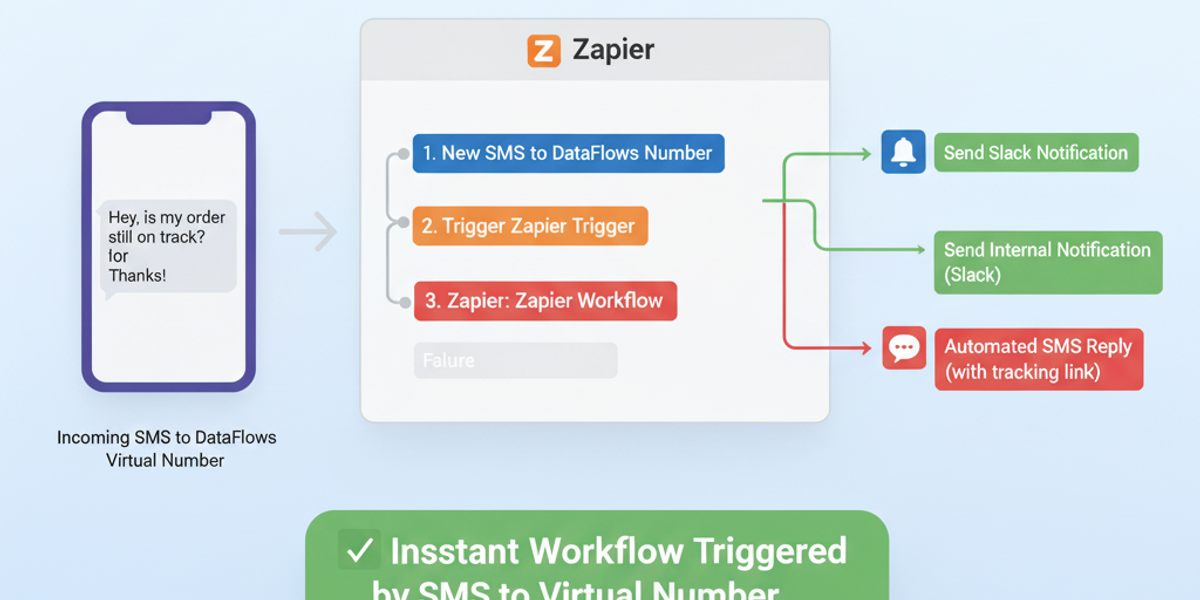
Introduction Every incoming SMS contains opportunities — customer inquiries, order confirmations, or urgent alerts. Manually monitoring messages can be time-consuming and prone to delays. With the DataFlows SMS + Zapier integration, you can automatically trigger workflows as soon as a new SMS arrives on your virtual number, ensuring immediate action and faster responses.
🔧 Connecting Your DataFlows Account to Zapier Before automating your workflows:
Log in to your DataFlows dashboard.
Copy your API Token from the Developer section.
Connect your DataFlows SMS account to Zapier using the API token.
Once connected, Zapier can instantly trigger workflows whenever a new SMS is received.
What This Feature Does The “New SMS Received” trigger allows you to:
Detect incoming SMS messages on your DataFlows virtual number instantly.
Trigger any Zapier workflow immediately, from sending notifications to updating records.
Begin multi-step automation pipelines automatically for every incoming SMS.
Why It Matters for Business
Immediate response — Quickly react to customer messages, inquiries, or alerts.
Operational efficiency — Reduce manual checking and ensure no message is missed.
Customer satisfaction — Faster response times improve the customer experience.
Automation foundation — This trigger is the starting point for complex workflows combining AI, categorization, and notifications.
How to Set It Up
Create a new Zap in Zapier.
Select DataFlows SMS as the trigger app.
Choose New SMS Received as the trigger event.
Connect your DataFlows account using your API token.
Specify the virtual number you want to monitor (if needed).
Add downstream actions, such as:
Send a Slack or Teams notification for incoming SMS.
Log the message into Google Sheets or your CRM.
Auto-respond with a templated SMS.
Test the Zap and turn it on.
From this point, every new incoming SMS will automatically trigger your configured workflows, ensuring instant action.
Real-World Example Use Case A logistics company receives SMS updates from delivery drivers:
A driver sends an SMS with delivery status.
The Zap instantly triggers: updates the delivery tracking system, sends a notification to the operations team, and logs the message in the CRM.
Real-time tracking improves efficiency and reduces customer queries.
Looking Ahead: Automation & AI
Combine New SMS Received with AI sentiment analysis to prioritize urgent or negative messages.
Automatically categorize incoming messages using Categorize SMS With AI.
Integrate with other business systems like CRM, Helpdesk, or inventory platforms for end-to-end automation.
Conclusion The New SMS Received trigger in DataFlows SMS + Zapier ensures no message is ever missed. Automate responses, notifications, and logging to save time, enhance operational efficiency, and improve customer experience.
👉 Start automating today by connecting your DataFlows virtual number to Zapier and instantly reacting to every incoming SMS.