Introduction
In today’s messaging world, sending an SMS is only half the job — knowing what happened to that message counts just as much. Did it get delivered? Did it bounce? Was it marked as failed? With the integration between DataFlows SMS and Zapier, you can build automated workflows that react instantly to delivery-status changes. That means better visibility, faster response to issues, and more reliable communication. 🔧 Connecting Your DataFlows Account to Zapier
Before you begin creating your first Zap, make sure you have an active DataFlows account.
Log in to your DataFlows Dashboard.
Go to the Developer section.
Copy your API Token — this token securely links your DataFlows account with Zapier.
When prompted in Zapier, paste your API token to connect your account.
Once your account is connected, Zapier can interact directly with your DataFlows SMS platform — allowing you to send, track, and automate SMS events seamlessly through your workflows.
What This Feature Does
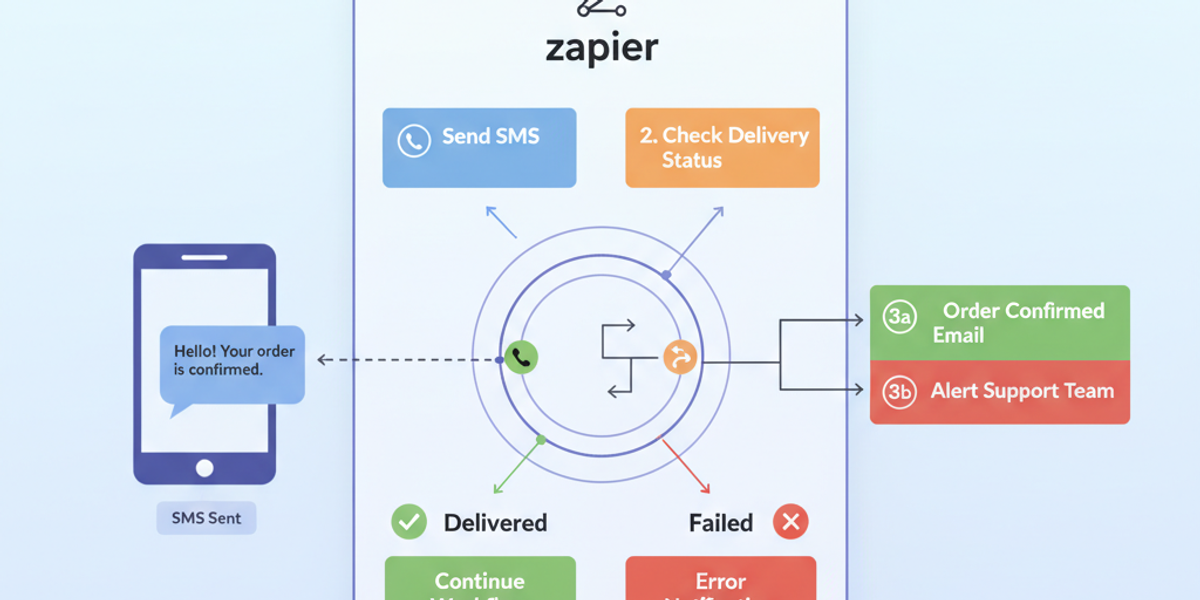
The “SMS Delivery Status Changed” trigger is one of the core capabilities of the DataFlows SMS + Zapier integration. From the Zapier app listing:
Triggers when an SMS delivery status changes (Delivered, Failed, Bounced, etc.). Zapier
What this gives you:
A webhook-style trigger in Zapier that fires immediately when a message in your DataFlows account has a status update.
The ability to use this trigger as the “start” of a Zap (Zapier workflow) — so you can follow with actions like Slack notifications, updating a spreadsheet, creating a support ticket, etc.
Better monitoring: you no longer need to manually check which messages failed; the system can handle it automatically.
Why It Matters for Business
Why should you care about delivery status? Here are some key benefits:
Proactive issue management: If a message fails or bounces, you can instantly trigger an alert or fallback action (e.g., retry the message via a different sender ID, notify the team).
Improved customer experience: If a critical SMS (such as verification, order update, or support notification) fails, the workflow can handle the failure to avoid ghost-customers.
Operational efficiency: Rather than manually auditing delivery reports, you can automate status tracking and downstream processes (logging, analytics, follow-up).
Data-driven insight: Over time you’ll build up data on delivery success rates, carriers, sender IDs etc — feeding into optimisation of your messaging campaigns.
How to Set It Up
Here’s a simplified setup flow:
In Zapier, create a new Zap and select “DataFlows SMS” as the app.
Choose the trigger “SMS Delivery Status Changed”.
Connect your DataFlows SMS account (authorize your credentials).
Define which statuses you want to listen for (e.g., Failed, Bounced, Delivered).
Add a downstream action — for example:
Send a Slack message to #sms-alerts: “SMS with ID {{UID}} failed to deliver to 61412345678.”
Update a Google Sheets row logging the failure for analytics.
Create a support ticket in Zendesk if the message is critical.
Test the trigger with a sample message to ensure it fires correctly.
Turn the Zap on — from now on, every time a delivery status changes, your workflow will run.
Real-World Example Use Case
Imagine you run a logistics business sending “Out for delivery” SMS notifications to customers. If one of these messages bounces, the customer might never get the update — leading to calls, complaints or missed deliveries.
Using this trigger, you can set a Zap: If status = “Failed” → Automatically send an email to the operations team, retry the SMS via alternate route, and log the incident. Result? Fewer missed notifications, fewer support calls, happier customers.
Looking Ahead: Automation & AI
While this feature is focused on delivery-status triggers, it forms the foundation of more advanced workflows — such as:
Automatically re-routing failed messages through a different sender ID or carrier.
Using AI to predict which sender IDs or times of day deliver best for each region.
Integrating with chatbots or support systems so that if an OTP SMS fails, the user is offered a call or email fallback automatically.
The tighter your system gets, the less you notice “message fails” and the more you can treat messaging as a seamless part of your workflow.
Conclusion
Automating your SMS delivery monitoring is no longer optional — it’s a critical part of modern communication management. With the DataFlows SMS + Zapier integration, specifically the “SMS Delivery Status Changed” trigger, you gain built-in alerting, workflow automation, and operational insight — making your messaging smarter, more reliable and more scalable.
👉 If you’re ready to get started, log in to your DataFlows account, connect with Zapier, and set up your first delivery-status Zap today.