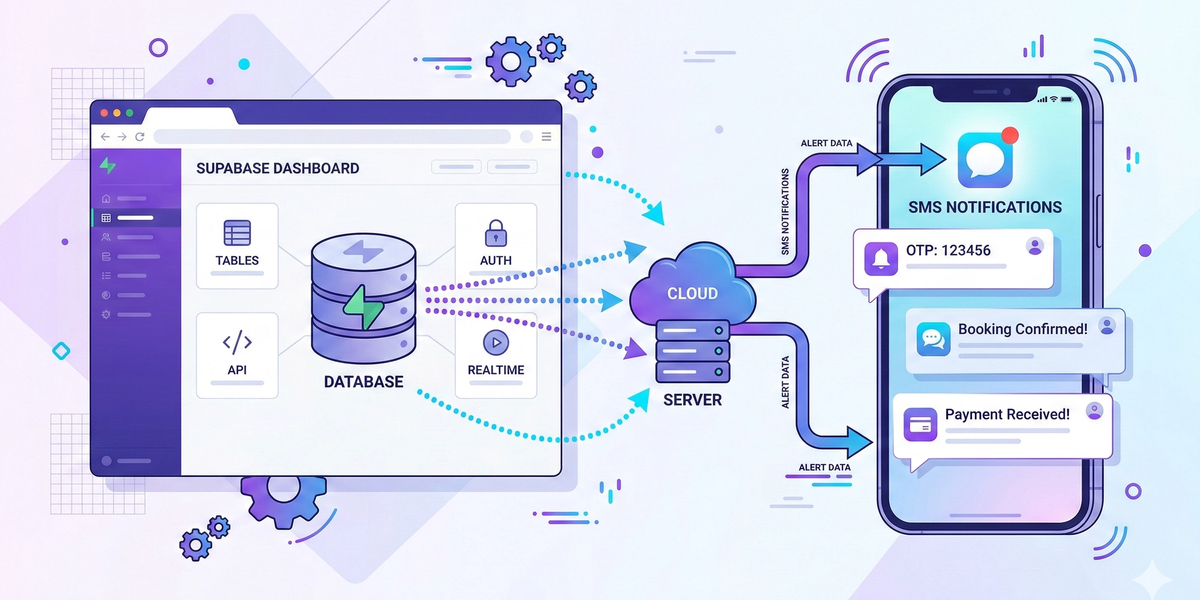
Modern applications rely heavily on real-time communication with users. Whether you're sending login verification codes, alerts, or notifications, SMS remains one of the most reliable ways to reach users instantly.
By integrating DataFlows SMS with Supabase, developers can automatically trigger SMS messages based on database events, user activity, or backend workflows.
This creates powerful automation for SaaS apps, marketplaces, and customer platforms.
What is Supabase?
Supabase is an open-source backend platform built on PostgreSQL that provides databases, authentication, APIs, and storage for modern applications.
One of Supabase’s most powerful features is that it automatically generates REST APIs for your database tables, allowing developers to easily connect their applications and trigger automated workflows.
When combined with DataFlows SMS, these workflows can instantly send SMS notifications whenever specific events occur in your database.
Why Use SMS with Supabase?
Many applications built with Supabase require real-time user communication.
Examples include:
User verification
Transaction alerts
Order updates
Security notifications
Customer engagement messages
SMS has extremely high open rates and does not require users to install any additional apps, making it ideal for critical communications.
How DataFlows SMS Works with Supabase
By connecting your Supabase backend with the DataFlows API, your application can automatically send SMS messages whenever certain events happen.
Typical flow:
1️⃣ A new user signs up in your Supabase database 2️⃣ Your backend triggers the DataFlows API 3️⃣ The user instantly receives an SMS message
Because Supabase provides instant APIs and event-driven architecture, developers can easily trigger SMS notifications from backend logic or serverless functions.
Common Use Cases
User Signup Verification
Send one-time verification codes during account registration.
Example message:
"Your verification code is 847392. Please enter this code to complete your signup."
Login Security Alerts
Notify users when a login attempt occurs.
Example:
"New login detected on your account. If this wasn't you, please secure your account immediately."
Order or Transaction Updates
If your app handles purchases or bookings, SMS can notify users about order confirmations or delivery updates.
Example:
"Your order has been confirmed and is being prepared."
App Notifications
Many SaaS products use SMS to notify users about:
subscription updates
service outages
important system notifications
Connecting DataFlows to Supabase
To integrate SMS messaging into your Supabase app:
1️⃣ Create a DataFlows account
2️⃣ Go to the Developer section in your dashboard
3️⃣ Generate your API Token
4️⃣ Use the DataFlows SMS API in your backend logic or serverless functions to send messages
Your application can then trigger SMS automatically whenever database events occur.
Example Automation Workflow
Here is a simple workflow many developers implement:
User registers in Supabase
Supabase function triggers webhook or backend logic
Backend calls the DataFlows SMS API
User receives verification SMS instantly
This process allows your application to deliver real-time communication with minimal infrastructure.
Benefits of Using DataFlows SMS with Supabase
• Real-time SMS notifications • Easy API integration • Global SMS delivery • Secure and reliable messaging • Perfect for SaaS applications and mobile apps
By combining Supabase’s powerful backend platform with DataFlows messaging infrastructure, developers can build scalable applications that keep users informed instantly.
Conclusion
Integrating DataFlows SMS with Supabase allows developers to automate communication directly from their application database.
From verification messages to transactional alerts, SMS helps improve user engagement, security, and overall app experience.
If you're building a modern application with Supabase, adding SMS notifications through DataFlows is a simple and powerful way to enhance your platform.